Shared Package management
Introduction
This document outlines the protocols and workflows for managing shared packages within the Gaya-Lib system. It details the storage, integration, and reintegration processes, ensuring that all team members are aligned and informed about the procedures. By following these guidelines, we aim to streamline our operations and enhance the consistency and quality of our shared assets.
Main Protocol Flow
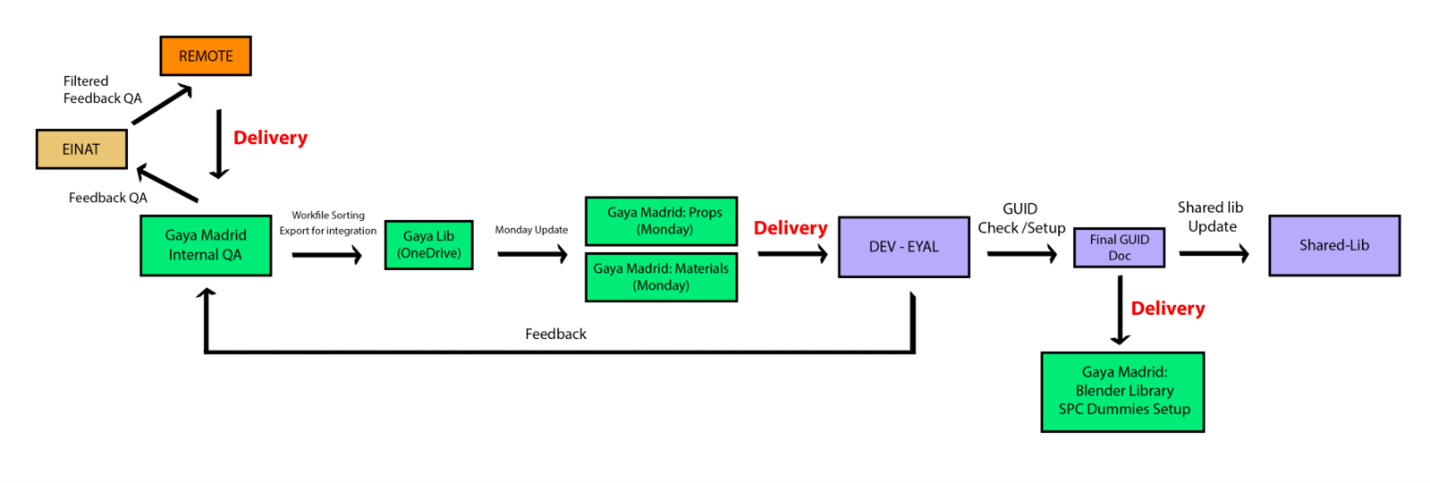
Storage and Updates
-
Gaya-Lib Source Files and Deliverables: Stored in OneDrive.
-
Reflection and Updates: Updates are mirrored in both Gaya Madrid: Props and Gaya Madrid: Materials Monday Boards.
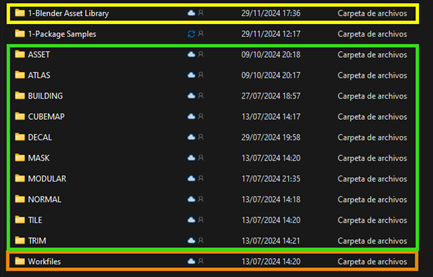
Gaya Lib Madrid (OneDrive)
-
Blender Asset Library (YELLOW): Contains Blender and Material assets used for tools like the Glider/Hangar generator. Updated after receiving the GUID Doc from DEV.
-
Gaya Lib (GREEN): The exported library where projects source materials. DEV retrieves updates from here.
-
Gaya Lib Workfiles (ORANGE): Stores and updates all workfiles of the library.
Shared ModelLib and Materials
Global Flow
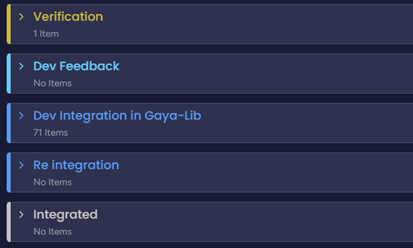
-
Integration Process:
-
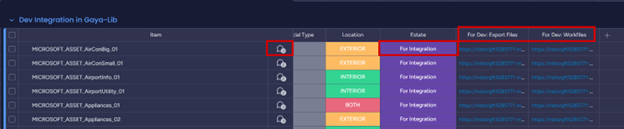
Madrid marks an item “For integration” and moves it to Dev Integration in Gaya Lib.
-
Automation sends an email to Eyal notifying that an item is ready for integration.
-
Relevant information and comments are added to the card for Dev.
-
Links for download are placed in For Dev: Export files and For Dev: Workfiles.
-
-
Dev Check:
-
Dev approves and marks the card as “Integrated”, moving it to the Integrated group.
-
Or Dev provides feedback, marking the card as “Dev Feedback” and notifying David and Mateo.
-
-
GUID Doc Update:
- When an item is marked as Integrated, Dev updates the GUID Doc for future SPCs Dummies creation.
Other Notes for Assets
-
Unique Textures: Each asset folder contains unique textures, with some assets using shared textures from Gaya Lib.
-
GLTF Exports: If no textures are in the export folder, it uses textures from the Shared Library.
Reintegration Flow
-
Reintegration Triggers: Needed for bug fixes or visual improvements.
-
Process:
-
Either Dev or Madrid marks the item as “Verification” with specific comments.
-
Automation moves the card to the Verification group.
-
After updates, Madrid marks it for “Reintegration”.
-
Automation notifies Eyal, and the item follows the regular integration flow.
Gaya Lib Delivery Example
- Materials: Folder named as the Monday card + PNG textures.
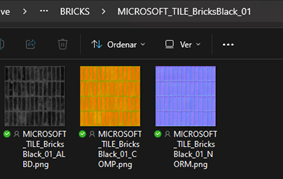
- Assets: Folder named as the Monday card + Exported Modellib (GLTFs + Textures).

Subitems
-
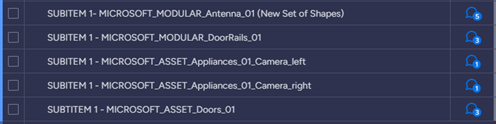
Definition: Variations of existing materials or assets that don’t require new sets.
-
Process: Subitems have their own cards and follow the integration flow without moving the parent item from the Integrated group.
Feedback and Notification Protocol
- Communication: Uses Monday comment section and automated email notifications to keep Madrid and Dev updated.
Global GUID Doc
- The GUID Doc should be an accessible online Excel document, editable by the Dev team. This document matches GLTF names with their corresponding GUIDs. When Dev marks an item as Integrated, they will update the GUID Doc accordingly.
Project Specific Deliveries
- Closed Projects: Specific deliveries for closed projects follow a different setup but adhere to the shared lib integration steps for global use materials and assets.
Catalog
- Updates: Either use the same board for integration or a direct update to the Monday/Folder structure as pointed out by Eyal.