Naming Conventions for MSFS Production
Introduction
In the realm of digital creation, the proliferation of folders, files, and components is inevitable. Whether it's a complex 3D mesh or a layered 2D image, even the most rudimentary project can quickly amass thousands of items. When combined with file naming conventions and storage locations, the task of locating specific items becomes daunting, let alone ensuring they are the most up-to-date versions.
These guidelines are specifically designed for the Gaya Microsoft Flight Simulator 2024 production pipeline.
Best practices for file naming and folder structure:
At this point it is important to start talking about the characters used in the naming of all folders/files/components and specifically which characters need to be avoided.
-
Special characters such as
~ ! @ # $ % ^ & * ( ) ; < > ? , [ ] { } ' "and|are illegal characters/symbols. -
Try not to make file names too long, since long file names do not work well with all types of software.
-
When using a sequential numbering system, using leading zeros for clarity and to make sure files sort in sequential order. For example, use
01, 02, ...10, 11instead of1, 2, ...10, 11. -
LOD filenames should be without leading zeros:
LOD0,LOD1,LOD2,LOD3,LOD4,LOD5, etc. -
Do not use spaces. Some software will not recognize file names with spaces, and file names with spaces must be enclosed in quotes when using the command line.
-
For any composed names, compress it in capitalized one word (PascalCase), ex:
BricksModern. -
Many consider the use of ‘spaces’ an easy way to keep things readable, as in:
MICROSOFT ASSET TrashBins TrashBag 01Which is fine for a folder or file name, until some software or system reads and displays it as:
MICROSOFT%20ASSET%20TrashBins%20TrashBag%2001As such, only underscores
_will be used to replace spaces, giving us:MICROSOFT_ASSET_TrashBins_TrashBag_01MICROSOFT_ASSET_TrashBins_TrashBag_01_Blue
Type of Resources and Shared Content
Right now, we have a few types of resources in production. It's important to specify what types they are to maintain this structure.
-
ASSET: Assets are 3 dimensional digital files; we are using this terminology to specify only 3d raw models.
-
DECAL, TILE, CUBEMAP (…): Texture and material files, they can include color maps, normal maps, specular maps, cube map, etc.
Shared Content and Packages
In the Microsoft Flight Simulator 2024 the key feature is the flexibility to use modular design and shareable packages for content. As we develop, content gets sorted into two main types of packages: shared and unique.
Shared packages contain assets like materials, trims, props, and generic buildings that are bundled into shared packages. Meanwhile, specific resources made for airports or points of interest get their own spot in product packages.
Example of packages ready in-game:
-
Pre-build shared package:
- microsoft-modellib-texture
- microsoft-modellib-assets
- microsoft-materiallib
-
Pre-build product package:
- microsoft-poi-iberia
- microsoft-airport-lemd-madrid
Fallback Textures
Microsoft Flight Simulator models rely on texture fallback directories to find them instead of looking relative to the *.glTF. Only the name of the texture is exported, the relative path is ignored.
Here the index must be incremented by 1 for each fallback path and must start at 1, for example:
 \[fltsim\]

 fallback.1=modellib\microsoft_rocks\texture

 fallback.2=.\microsoft_texture\texture
Note
Some of our file and folder conventions do not apply to the deployed packages in game, this will not affect how we’re doing internally.
This approach significantly impacts the art pipeline. While some assets can utilize shared materials to streamline development, there's also a need to explore unique maps for various reasons.
The code provided illustrates how the engine searches for fallback textures. Initially, it looks within the current package; if the texture is not found there, it then searches in the common texture folder for fallback options.
For instance, let's consider the product package microsoft-airport-lemd-madrid with unique models, these models may or may not utilize shared texture maps microsoft-modellib-texture. The same happen during the level design development, the developer can use GUID referenced from microsoft-modellib-assets, which also fallback to shared maps in microsoft-modellib-texture.
File naming validation and Entity Names
The validation process occurs during distribution, but let’s discuss it now since it will affect how we manage the folders and files.
As we saw before, we have two main types of resources. Let’s break it down into shared content, validation, and entities.
Shared Resources
For generic resource types that are typically shared between many different products, we have the following validation rule.
Validation Rule:
 {ownership}\_{type}\_{name}\_{number:optional}\_{variant:optional}.{extension}

{ownership} : MICROSOFT, GAYA

{type} : TILE, DECAL, ASSET, …

{name} : TrashBins, Door, Concrete, GenericGlass, …
Examples:
MICROSOFT_ASSET_TrashBins_TrashBag_01_BlueMICROSOFT_ASSET_TrashBins_TrashBag_01MICROSOFT_TILE_GenericGlass_01MICROSOFT_DECAL_Dirt_01
Textures.Com Resources
Important
All the original textures downloaded from Textures.com need to be uploaded to this location: Shared drives\GAYAShared\Texture_com_download
In order to avoid duplication of the same texture sets downloaded from Textures.Com, we use _TC_ in the name + the exact name of the texture downloaded from Textures.Com.
For example: For this material, the files are named “TCom_Wood_Worn3_2K_albedo.tif”
We should use the “Wood_Worn3” part and add it to our name like this:
MICROSOFT_TC_Wood_Worn3_ALBD/COMP/NORM
Because we are multiple studios contributing to the texture library, this will help tracking down what texture sets have been added from Textures.Com and avoid adding it again with a different naming.
This means:
- Whoever will add a TC material in the library will have to check if the material already exists.
- Because we’re using the exact naming as TC, it should be an easy search.
- If the texture doesn’t exist, we have to use the exact naming TC is using.
- Using TC, artists can easily understand what is the source of that texture.
Non-Shared Resources
Unique assets generally used directly in the final product package. We should include the type of entity in our validation rules. The entity can be an Airport, POI, Oil Rigs, Aircraft, etc.
Validation Rule:
 {ownership}_{entity}_{name}_{number:optional}_{variant:optional}.{extension}

 {ownership} : MICROSOFT, GAYA

 {entity} : POI_UK, POI_BR, LLBG_01, SBMG_19, OILRIG, …

 {type} : TILE, DECAL, ASSET, …

 {name} : Core_01, LEMD_01, Concrete, GenericGlass, …
In this type of resource for non-shared content, we have some extra rules for each specific {entity}:
-
Airports: we include the number of buildings related to that asset. For example:
LEMD_10,LLBG_02. -
POI: POI Model Naming Convention - MSFS 2024
Format: PROJECT_POI_NameOfPoi
Rules:
PROJECT- Defined by the company at the beginning of the projectPOI- Always use "POI"NameOfPoi- Use PascalCase (each word starts with capital letter, NO underscores)
For WU - South Africa we would use project name - SA
Example - SA_POI_NelsonMandelaStatue
Secondary/Sub-Models
For secondary models that are part of a main POI but created separately, add a descriptive suffix to the main POI name:
Main model: SA_POI_NelsonMandelaStatue
Secondary models: SA_POI_NelsonMandelaStatueSign
- For other entities, no specific treatment is required.
Examples:
MICROSOFT_LEMD_01_Core_01MICROSOFT_LEMD_01_Core_Door_01MICROSOFT_LEMD_01_Core_Door_01_WhiteBlueSA_POI_NelsonMandelaStatueSA_POI_NelsonMandelaStatueSignMICROSOFT_OILRIG_Crane_02_Base_White
## Files and Folders for Work Production
The work folder primarily contains content to be used during the production stage, which can include both unique products and shared content between products.
Everything we discussed previously, and all predefined rules will directly impact how the work folders are organized. It's important to keep our internal structure organized and ready to utilize the concept of fallback textures in our 3D software, as this should be applied to the post-production package.
Below, you can find the required folder structure to be used for shared content and products.
### Shared Folder
A shared folder library would be maintained outside of any single project. This type of asset will be shared between many other product packages, including airports, POIs, etc.
shared
 ├── ASSET \# Type for resource for shared packages.

     ├── DOORS

     ├── EXTERIOR

         ├── MICROSOFT_ASSET_TrashBins_01 \# Asset Folder

             ├── previews \# Previews for hub asset page view

                 ├── ... (\*.png)

             ├── texture \# Unique maps for this asset, if necessary.

                 ├── MICROSOFT_ASSET_TrashBins_01_ALBD.png

                 ├── MICROSOFT_ASSET_TrashBins_01_COMP.png

                 ├── MICROSOFT_ASSET_TrashBins_01_NORM.png

             ├── MICROSOFT_ASSET_TrashBins_TrashBag_01.max

             ├── MICROSOFT_ASSET_TrashBins_TrashBag_01.blend

             ├── MICROSOFT_ASSET_TrashBins_TrashBag_01_LOD0.fbx

             ├── MICROSOFT_ASSET_TrashBins_TrashBag_01_LOD1.fbx

             ├── MICROSOFT_ASSET_TrashBins_TrashBag_01_LOD2.fbx

             ├── MICROSOFT_ASSET_TrashBins_TrashBag_01_LOD3.fbx

 ├── ...

             ├── thumbnail.png \# Thumbnail for Hub list

     ├── INTERIOR

     ├── LIGHTS

     ├── ...

 ├── MATERIAL \# Materials for shared packages.    ├── ATLAS

     ├── DECAL

     ├── TILE

         ├── BRCKS

         ├── CONCRETE

             ├── MICROSOFT_TILE_BricksModern_01 \# Material Folder

                 ├── previews \# Previews for hub asset page view

                     ├── ... (\*.png)

                 ├── MICROSOFT_TILE_BricksModern_01.sbs

                 ├── MICROSOFT_TILE_BricksModern_01.sbsar

                 ├── MICROSOFT_TILE_BricksModern_01_ALBD.png

                 ├── MICROSOFT_TILE_BricksModern_01_COMP.png

                 ├── MICROSOFT_TILE_BricksModern_01_NORM.png

                 ├── MICROSOFT_TILE_BricksModern_01_EMIS.png

                 ├── thumbnail.png \# Thumbnail for Hub list

         ├── METAL

         ├── WOOD

     ├── ...

 └── ...
Non-Shared Folder
Additionally, we have a unique packages folder to organize the production for unique assets. Even if a product contains shared content used in-game, the unique assets should be related to their own work folder.
product_name
 ├── ASSET \# Type of resource for unique product

     ├── MICROSOFT_LEMD_01_Door_01 \# Asset folder

         ├── previews \# Previews for hub asset page view

             ├── ... (\*.png)

         ├── texture \# Unique texture maps for this asset

             ├── MICROSOFT_LEMD_01_Door_01_ALBD.png

             ├── MICROSOFT_LEMD_01_Door_01_COMP.png

             ├── MICROSOFT_LEMD_01_Door_01_NORM.png

         ├── MICROSOFT_LEMD_01_Door_01.max

         ├── MICROSOFT_LEMD_01_Door_01.blend

         ├── MICROSOFT_LEMD_01_Door_01_LOD0.fbx

         ├── MICROSOFT_LEMD_01_Door_01_LOD1.fbx

         ├── MICROSOFT_LEMD_01_Door_01_LOD2.fbx

         ├── MICROSOFT_LEMD_01_Door_01_LOD3.fbx

         ├── ...

         ├── thumbnail.png \# Thumbnail for Hub list

     ├── ...

 ├── DECAL \# Type of resource for unique product

     ├── MICROSOFT_LEMD\_ \_DecalTrim_01 \# Material Folder

         ├── previews \# Previews for hub asset page view

             ├── ... (\*.png)

         ├── MICROSOFT_LEMD_01_DecalTrim_01.sbs

         ├── MICROSOFT_LEMD_T4S_DecalTrim_01.sbsar

         ├── MICROSOFT_LEMD_T4S_DecalTrim_01_ALBD.png

         ├── MICROSOFT_LEMD_T4S_DecalTrim_01_COMP.png

         ├── MICROSOFT_LEMD_T4S_DecalTrim_01_NORM.png

         ├── thumbnail.png \# Thumbnail for Hub list

     ├── ...
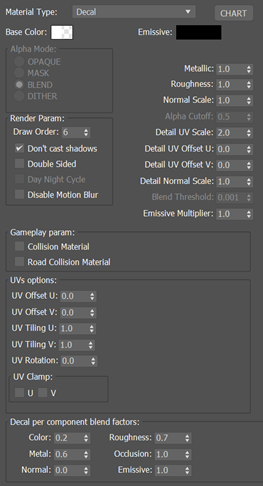
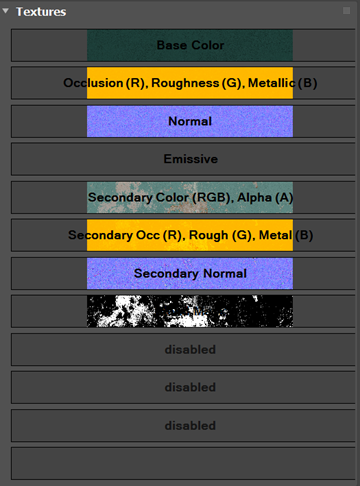
If a material requires unique settings to be followed by the developer, the artist can add a single screenshot to the asset folder.
 ├── MATERIAL

 ├── ATLAS

     ├── DECAL

     ├── TILE

         ├── BRCKS

         ├── CONCRETE

             ├── MICROSOFT_TILE_BricksModern_01

                 ├── previews

                     ├── ... (\*.png)

                 ├── MICROSOFT_TILE_BricksModern_01.sbs

                 ├── MICROSOFT_TILE_BricksModern_01.sbsar

                 ├── MICROSOFT_TILE_BricksModern_01_ALBD.png

                 ├── MICROSOFT_TILE_BricksModern_01_COMP.png

                 ├── MICROSOFT_TILE_BricksModern_01_NORM.png

                 ├── MICROSOFT_TILE_BricksModern_01_EMIS.png

                 ├── thumbnail.png

                 ├── material_settings.png \# Picture of Material Settings

         ├── METAL

         ├── WOOD

 *\* Note: This will be improve to .mat Json file in future.*
Hub Distribution (On Going)
The asset is now completed, but thus far, no one has seen it. We should distribute it to the Hub to be accessed by other artists, technical artists, and the development team.
Note
While we develop the new Gaya Hub, the assets will be distributed via the Monday platform following the guidelines below. Some requirements like thumbnails and previews will be ignored during the upload process, but it is a required practice to follow for a smooth transition to the Gaya Hub.
Since we now have a very organized folder structure, we should only zip our main resource folder and send it using the Monday form.
 ├── ASSET

     ├── MICROSOFT_LEMD_01_Door_01 \# Folder to zip.

         ├── previews

             ├── ... (\*.png)

         ├── texture

             ├── MICROSOFT_LEMD_01_Door_01_ALBD.png

             ├── MICROSOFT_LEMD_01_Door_01_COMP.png

             ├── MICROSOFT_LEMD_01_Door_01_NORM.png

         ├── MICROSOFT_LEMD_01_Door_01.max

         ├── MICROSOFT_LEMD_01_Door_01.spp

         ├── MICROSOFT_LEMD_01_Door_01_LOD0.fbx

         ├── MICROSOFT_LEMD_01_Door_01_LOD1.fbx

         ├── MICROSOFT_LEMD_01_Door_01_LOD2.fbx

         ├── MICROSOFT_LEMD_01_Door_01_LOD3.fbx

          ├── ...

         ├── thumbnail.png

     ├── ...
Note
Due to the limitation of Monday.com, please, do not include .spp files. They should be a link shared from any storage file service.
Form Upload
Please use the following form to upload your completed resource:
(https://forms.monday.com/forms/6f2ce4a47dcf0ca36fe45bbac496a0d7?r=use1)
| Name* | Description |
|---|---|
| Name*: | The name of the asset, which can be the name of the folder, e.g: MICROSOFT_LEMD_01_Door_01 |
| Comments: | Feel free to add any comments for artists, technical artists, or developers. |
| Image* | Upload your thumbnail.png. |
| Artist Name* | Select your name or team from the dropdown menu. |
| Project* | The name of Project |
| Tags* | Use tags that make sense for your asset, e.g., model, material, industrial, metal, white, blue, poi, airport, concrete, etc. |
| Source* | Upload the zipped asset folder. |
| SPP Source* | Please provide a link to them from any storage file service |
** Required field
Warning
If you are missing the project name or artist name, talk with your lead, we will address the issue asap.
Project Folder
Final Comments
This document is under revision and can be changed at any time. The guidelines provided above should be implemented ongoing and should not affect past work that has already been completed. Additionally, you can expect unique project specifications, if necessary.